

Understanding How a Proxy Server Operates and Functions
Unlock the secrets behind proxy servers and how they act as intermediaries for your internet traffic. Discover the mechanics that provide enhanced privacy and control over your online experience.
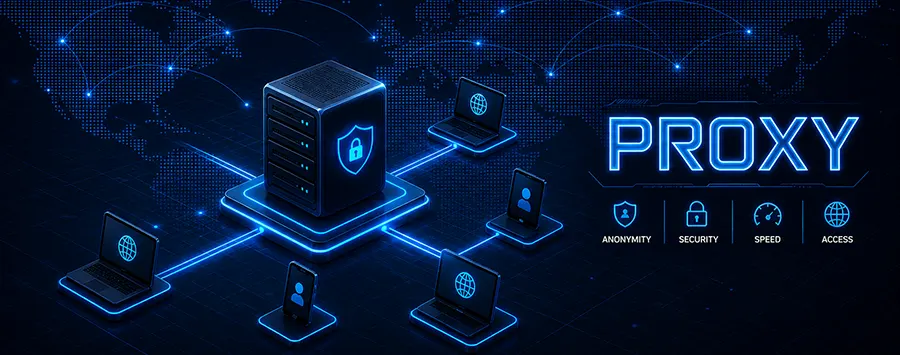
Imagine you are sending a letter to a friend, but instead of putting it directly in the mailbox, you give it to a trusted assistant. This assistant rewrites the sender's address on the envelope to their own, posts the letter, receives the reply, and then brings it back to you. To your friend, the correspondence appears to come from the assistant. To the outside world, the assistant's address is the point of origin. This, in essence, is the fundamental principle of a proxy server.
So, What Exactly Is This Digital Middleman?
At its core, a proxy server is an intermediary server that sits between your device - be it a computer, phone, or tablet - and the vast expanse of the internet. Think of it as a gateway or a digital checkpoint. When you use a proxy, your web requests no longer travel directly to the website you want to visit. Instead, they are first routed through this intermediary server.
The proxy server then makes the request on your behalf. It fetches the data from the target website and subsequently relays it back to you. This process creates a layer of separation between your local network and the websites you browse. This simple act of intermediation unlocks a surprisingly wide array of functions, from enhancing privacy to improving performance.
Why would anyone want to add this extra step? The reasons are more common than you might think. Perhaps you are at work and need to access a website that your company's network firewall blocks. Maybe you are traveling and want to watch a show that is only available on a streaming service back home. Or possibly, you are simply someone who values a degree of anonymity while surfing the web. In all these scenarios, a proxy server becomes an invaluable tool.
The Journey of a Web Request Through a Proxy
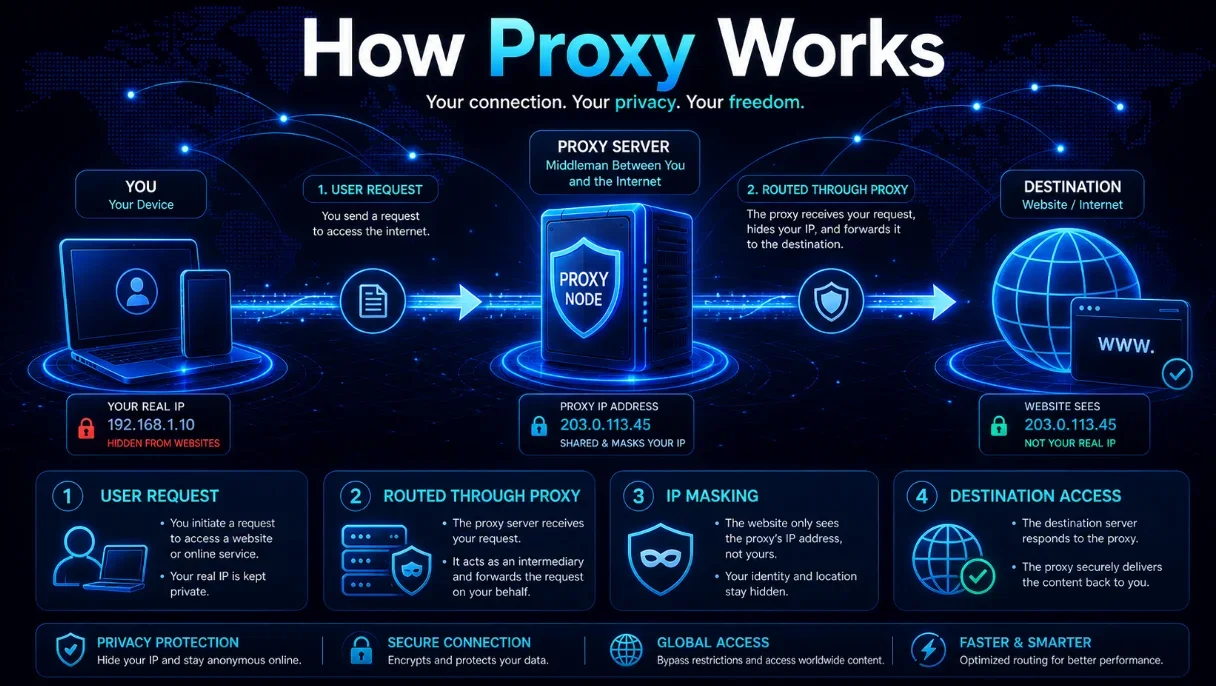
To truly grasp how a proxy works, let us break down the step-by-step journey of a simple web request. The path changes significantly when a proxy is involved.
First, you type a web address, like www.example.com, into your browser and hit enter. Normally, your computer would communicate directly with the server hosting that website. However, with a proxy configured, your browser recognizes that it must send this request to a specific intermediary address - the proxy server's IP address.
Your request, which contains information about the website you want and data about your own computer, is packaged up and sent to the proxy. Crucially, a key piece of information in this package is your IP address, a unique identifier for your device on the internet, similar to your home's street address.
The proxy server receives your request. Here, depending on its configuration and type, it can do several things. It might check its own temporary storage, or cache, to see if it already has a recent copy of the website you are asking for. If it does, it can send that cached copy back to you immediately, resulting in blazing-fast loading times. If not, it proceeds to make the request to the actual www.example.com server.
When the proxy contacts the target website, it uses its own IP address, not yours. From the perspective of the website's server, the visitor is the proxy server. The website sends the requested data back to the proxy, which then forwards it along to your browser. You see the website load as expected, but the website remains unaware of your original IP address.
Unmasking the Different Faces of Proxy Servers
Not all proxy servers are created equal. They come in various types, each designed with specific purposes and levels of functionality in mind. Understanding these differences is key to choosing the right tool for the job.
The most basic distinction lies in how they handle your IP address. A transparent proxy does little to hide your identity. It forwards your request but informs the website of your original IP address. Organizations often use these for content filtering and caching without the intention of providing anonymity.
An anonymous proxy, on the other hand, is a step up in privacy. It hides your IP address from the website you are visiting. The website will know that a proxy is being used, but it will not know who is behind it. This is a popular choice for general privacy-conscious browsing.
Then there is the high-anonymity proxy, often called an elite proxy. This type takes privacy to the next level. It not only conceals your IP address but also hides the fact that it is even a proxy. To the destination website, the request appears to come from a regular, non-proxy user. This makes it significantly harder to detect and block.
Beyond anonymity, proxies are also categorized by their infrastructure. We will delve deeper into the most common ones in a moment, but they range from shared proxies used by many people simultaneously to dedicated private proxies reserved for a single user, offering superior speed and security.
When Your Home Location Matters Less
One of the most practical and widely used applications of proxy servers is geo-location spoofing. The internet is not a uniform space; content availability often depends on your geographical location. Streaming services, news websites, and even product pricing can vary from country to country.
A proxy server allows you to overcome these digital borders. By connecting to a proxy server located in a specific country, say the United Kingdom, you can effectively borrow that server's location. When you request access to a UK-only streaming service, your request goes to the UK-based proxy. The service sees a request originating from within the UK and grants access, seamlessly unlocking the content for you.
This capability is not just for entertainment. Researchers, journalists, and businesses use geo-location proxies to view search results as they appear in different regions, check localized advertising campaigns, and gather market-specific data without physically being present. It is a powerful tool for understanding the globalized, yet region-locked, nature of the modern web.
The Security Side of the Equation
While often associated with bypassing restrictions, proxy servers play a significant role in organizational security. Companies deploy proxies as a first line of defense for their internal networks. These corporate proxies act as a single, controlled gateway through which all internet traffic must pass.
This centralized point of control allows network administrators to enforce security policies. They can block access to malicious websites known for phishing attacks or hosting malware. They can filter out inappropriate or non-work-related content, which helps in maintaining productivity and ensuring a safe digital work environment.
Furthermore, these proxies can scan incoming data for threats before it reaches an employee's computer. They can log all web traffic, which is invaluable for auditing and investigating security incidents. By funneling traffic through a proxy, an organization can protect its sensitive internal data from direct exposure to the open internet.
However, it is a double-edged sword. The same logging capability that helps with security can also be used for employee monitoring. This highlights the importance of understanding the purpose of the proxy you are using, whether it is for your protection or for the oversight of your activities.
A Word on the Performance Boost
Besides security and anonymity, proxies can significantly speed up your internet browsing through a process called caching. A cache is a temporary storage area for web data. When a proxy server is used by multiple people within an organization, it can store copies of frequently accessed websites.
Imagine one hundred employees in an office all checking the same news homepage first thing in the morning. Without a proxy, the company's internet connection would have to handle one hundred separate requests to the news website's server, consuming a lot of bandwidth and slowing everyone down.
With a caching proxy, only the first employee's request is sent to the external website. The proxy saves a copy of the page. When the next ninety-nine employees make the same request, the proxy serves them the cached copy instantly from its local storage. This reduces bandwidth usage dramatically and loads the page much faster for the majority of users. It is a smart way to optimize network performance.
The Not-So-Distant Cousin - VPNs
It is impossible to discuss proxies without mentioning Virtual Private Networks, or VPNs. While they share the common goal of providing privacy and bypassing restrictions, their methods and scope are quite different. Understanding this distinction is crucial.
A proxy server typically acts on behalf of a single application, like your web browser. You configure the browser to use a proxy, and only the traffic from that browser is routed through it. Other applications on your computer, like a standalone email client or a game, continue to use your direct internet connection.
A VPN, in contrast, creates a secure, encrypted tunnel for your entire device. Once you connect to a VPN, all internet traffic from your computer - from every application - is routed through the VPN server. This provides a more comprehensive level of privacy and security.
The following table illustrates the key differences at a glance:
| Feature | Proxy Server | VPN |
|---|---|---|
| Scope of Coverage | Usually application-specific (e.g., a browser) | Whole device and all internet traffic |
| Encryption | Typically, no encryption | End-to-end encryption |
| Primary Focus | Anonymity, bypassing filters, caching | Privacy, security, and encryption |
| Speed | Can be faster due to caching | Can be slower due to encryption overhead |
So, while a proxy is like hiring a courier to deliver a single letter anonymously, a VPN is like building a secure, private tunnel for all your mail to travel through, hidden from view and protected from tampering.
Are There Any Reasons to Be Cautious?
Like any tool, proxy servers have their drawbacks, and it is important to be aware of them. The very nature of a proxy - an intermediary that handles your data - introduces potential risks.
The most significant concern is trust. When you use a proxy, especially a free one, you are entrusting a third party with your web traffic. A malicious or poorly operated proxy can log your activities, inject unwanted advertisements into the web pages you visit, or even steal sensitive information like login credentials. You are essentially handing over your keys to a stranger.
Another issue is reliability and speed. Free proxies are often overcrowded with users, leading to slow and unstable connections. They may frequently go offline or suffer from inconsistent performance, making for a frustrating browsing experience.
Furthermore, some websites are wise to the use of proxies and actively block traffic coming from known proxy server IP addresses. This can prevent you from accessing the very content you were hoping to reach, rendering the proxy useless for that particular task.
It is also worth noting that while a proxy can hide your IP address from a website, it does not encrypt your traffic. Any data sent between you and the proxy, and between the proxy and the website, can potentially be intercepted by others on the network, unless the website itself uses HTTPS encryption.
Choosing the Right Tool for Your Needs
Given the variety of proxies and their close relative, the VPN, how do you decide what is best for you? The answer depends entirely on your primary objective.
- For quick, simple tasks like accessing a geo-blocked news article or a video, a reputable web-based proxy or a browser extension might suffice. It is a lightweight solution for occasional use.
- For consistent privacy while browsing the web and you are only concerned about your browser activity, a paid, anonymous HTTP/S proxy could be a good fit. It offers a balance of performance and anonymity.
- For comprehensive security and privacy for your entire device, especially when using public Wi-Fi networks, a VPN is the superior choice. The encryption it provides is essential for protecting all your data.
- For business purposes like web scraping, ad verification, or managing multiple social media accounts, dedicated or residential proxies are often necessary to avoid detection and blocking.
The key takeaway is to assess your risk tolerance and needs. For high-stakes activities involving sensitive data, investing in a trusted, paid service is always advisable over relying on a free, unknown alternative.
The Ever-Evolving Role of the Proxy
The technology landscape is never static, and the role of proxy servers continues to evolve. While VPNs have captured the popular imagination for personal privacy, proxies remain deeply embedded in the infrastructure of the internet.
In the world of big data and artificial intelligence, proxies are indispensable. Data scientists use vast networks of proxies to gather large datasets from the web for training machine learning models. E-commerce companies use them to monitor competitors' prices and product availability across different regions in real-time.
As the Internet of Things connects more devices, proxies can help manage and secure the communication between these devices and cloud services. The fundamental concept of an intermediary - a gateway that controls, filters, and manages flow - is perhaps more relevant today than ever before.
So, the next time you encounter a website that looks different from another country or experience blazing-fast page loads on a corporate network, you will know there is a good chance a proxy server is working behind the scenes. It is the silent, often invisible workhorse that shapes so much of our digital experience.